

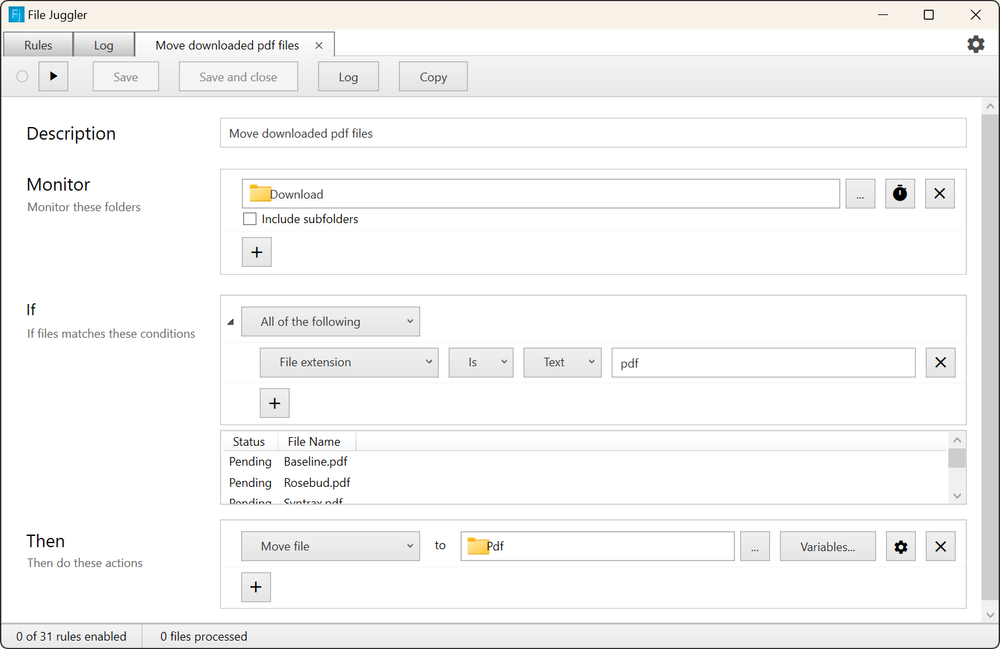
File Juggler is a powerful desktop application designed to automate file organization and management on your Windows computer. It allows users to create custom rules that monitor specific folders and automatically react to files, performing actions like renaming, moving, or deleting them instantly.
Key Features:
- Automatic Workflows: Set up rules to automate repetitive file tasks.
- Intelligent File Monitoring: Monitors any folder and reacts to files based on defined criteria.
- Content-Based Organization: Reads file contents (e.g., documents, PDFs) to extract information like dates or keywords, using them to rename or move files to appropriate locations.
- File Actions: Automatically rename, move, copy, or delete files.
- Maintenance Simplification: Reduces manual effort in managing downloads, desktop clutter, and document archives.
Use Cases:
- Automatically move downloaded PDF files to a "PDFs" folder.
- Rename invoices or statements by extracting dates from their content.
- Keep your desktop and downloads folder clean and organized.
- Extract downloaded archive files automatically.
- Organize documents based on keywords within their content.
- Integrate with services like Evernote for automatic uploads.


